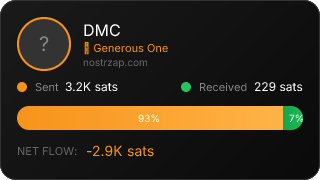
DMC

DMC

@DMC

34
Followers
172
Following
453
Notes
15
# Zaps
Joined
5/5/2024
Last Active
18 hours ago
NIP-05
Not Verified
Lightning
Available
🎯ProfilestrDeveloping
58/100
📊VertexBuilding Trust
top 10%
🌐RelatrModerate
0.57

Activity

Replies18
Media Posts0
Total Sats Zapped3,151
NostrZap Stats

Details

Public Key (npub)
npub1s8yz9rzc5udsarhhgu507653y4sketgqpff22326z7arsxd87deshs9c90
Hex Key
81c8228c58a71b0e8ef74728ff6a9125616cad000a52a5455a17ba3819a7f373
Lightning Address

Discover More Profiles

144MB

144MB

@144MB

I sign Floppy PNGs with the same private key associated with this npub. My entire software repo is inside my banner PNG. It can be extracted with this script: Deno.writeFileSync("f.z",Deno.readFileSync("f.png").slice(41,-16)) new Deno.Command('pigz',{args:['-d','-f','-k','f.z']}).outputSync() let extracted_data=Deno.readFileSync('f') const data_length=parseInt(new TextDecoder().decode(extracted_data.slice(65,4120)).split('\n')[0]) const unfiltered=new Uint8Array(extracted_data.length) let f=0,p=0,r=0 do{if(r==4140||f==0){f++;r=0;} else {unfiltered[p]=extracted_data[f];r++;f++;p++;}}while(f<extracted_data.length) let site_text=(new TextDecoder().decode(unfiltered.slice(542340,542340+data_length))) Deno.writeTextFileSync('site.txt',site_text) This should be verified. I sign the data part of the PNG and use the top row to store the secp256k1 signature. This can be verified with this script: import { sha256 } from "@noble/hashes/sha2"; import { schnorr } from "@noble/curves/secp256k1"; import * as pako from "pako"; try { let f = 0, p = 0, r = 0; const fpng_img = Deno.readFileSync(Deno.args[0]); const pub = Deno.readTextFileSync(Deno.args[1]).trim(); const zdat = pako.inflate(fpng_img.slice(41, -16)); const u = new Uint8Array(zdat.length); do { if (r == 4140 || f == 0) { f++; r = 0; } else { u[p] = zdat[f]; r++; f++; p++; } } while (f < zdat.length); const dl=parseInt(new TextDecoder().decode(zdat.slice(65,4140)).split('\n')[0]) console.log(schnorr.verify( new Uint8Array(zdat.slice(1, 65)), sha256(u.slice(542340, dl + 542340)), pub, )); } catch { console.log("Usage: lverify [Floppy PNG] [144MB Hex Public Key]"); } The extract script itself can be extracted from the Floppy PNG using the instructions on the header of the banner of the PNG in my profile banner. It is all so wonderfully self-referential, no? Note that to use the verify script you need something like this package.json: { "name": "anything", "version": "1.0.0", "dependencies": { "@noble/curves": "^1.9.2", "@noble/hashes": "^1.8.0", "pako": "^2.1.0" } } Later versions of noble/curves need a different import. Also, if you want to use that same site.txt file to load a web page, you can use this: <!DOCTYPE html> <html lang="en"> <head> <meta charset="utf-8"> <title>Floppy PNG</title> <meta name="viewport" content="width=device-width,initial-scale=1"> </head> <body> <div id="l"></div> <script> fetch('site.txt').then((resp) => { resp.text().then((t)=>{ s = document.createElement("script"); s.appendChild(document.createTextNode(t)); document.body.appendChild(s); })}) </script> <div id="main"></div> </body> </html> You need to remove the verify() command for it to work as a live web page. Verify the sig separately, remove the line, and spin up some kind of local web server. Most of the time the verify() command is the last line of site.txt. The web application for all browsers is listed in the floppypng.com repo (src/browser.js).

10
Followers
221
Notes
0
# Zaps
Public Key
npub1a2g7uthlp9ppzk64zkaahmsjtx703x0cm3umx02c2fx3qn3at66spp9ssf
Last Active1mo ago
Jarbas da Costa

Jarbas da Costa

[email protected]
28
Followers
0
Notes
0
# Zaps
Public Key
npub129fmq9vdj0xu76pmh6tanfkax8tt7p3z6g3xlhfu0dan3v8ceslqsvn4da
Last Active15d ago
cecilia

cecilia

@cecilia

[email protected]
22,620
Followers
763
Notes
1,496
# Zaps
Public Key
npub1paftqx5zvj0gjtu3whudejxdgv4vdn27paw4lzaauc43kgfxxaqs75c5a7
Last Active4h ago